
Victron MultiPlus Wiring Diagram: How to Wire and Set Up Victron's Popular Inverter/Charger

The Victron MultiPlus is one of the most widely used inverter/chargers in campervan electrical systems, and with good reason. Its strong stable of unique features make it powerful, efficient, and easier to wire than its competitors.
In this guide, we’ll break down an AC system step by step using a Victron MultiPlus wiring diagram produced with our Wireframe software, so you can see exactly how everything connects together. We’ll start with an overview of what makes the MultiPlus different from a standard inverter/charger, then move into a detailed, practical walkthrough of the wiring itself, including AC input from shore power, AC output to your plug sockets, DC battery connections, grounding, and the auxiliary terminals.
We'll show you you where the wires go and explain why they go there, so you can build a system that’s safe, compliant, and easy to troubleshoot down the line.

Shane is an NCC-certified electrical installer. He has built, taught, and lived in campervans since 2019.
This post contains affiliate links. We may earn a commission at no extra cost to you. To understand our policies on content, affiliate commissions, and liability, please review our Terms of Use.

In This Guide
What Makes the Victron MultiPlus Different from Other Inverter/Chargers?
An inverter/charger combines two devices in one unit: an inverter, which turns your battery’s 12V, 24V, or 48V DC power into 230V AC power, and a battery charger, which charges your leisure batteries when you plug into shore power (mains) or a generator. The Victron MultiPlus is an inverter/charger that stands out due to its intelligent management of limited AC power, its neat integration into the wider Victron monitoring ecosystem, and how many useful switching and protection functions it already has built in.
PowerAssist
The feature that most clearly separates the MultiPlus from a lot of cheaper or more basic inverter/chargers is Victron’s PowerAssist. This feature comes into play whenever you're connected to a weak campsite hookup, a small generator, or any other AC source with a strict current limit. The MultiPlus can be set to respect that input limit, and if your loads momentarily ask for more power than the hookup can provide, it makes up the shortfall from the battery. When demand drops again, it uses the spare incoming power to recharge the battery.
This is one of the biggest reasons people choose a MultiPlus over other inverter/chargers. Other devices will either pull too much current from shore power and trip the bollard, or else simply leave you constrained by whatever current the hookup can supply. The MultiPlus is designed to smooth that out. In practice, that means you can run demanding loads more comfortably on limited shore power without constantly babying the system. Victron pairs this with PowerControl, which reduces battery charging current when necessary so the charger itself doesn't overload the incoming AC supply.
Built-in Automatic Transfer Switch
Whereas with most inverter/chargers, you have to implement this yourself, the ATS feature is built-in to the Victron MultiPlus. That makes the system feel far more polished in day-to-day use. Plug into shore power and the van’s AC circuits can be passed through and the batteries charged. Unplug, or suffer a mains drop, and the inverter takes over almost instantly. You don't need a separate external changeover arrangement to create that basic functionality; the MultiPlus already has it built in.
Built-in Neutral-Earth Bonding
Neutral-earth is a very important, but oft-overlooked safety feature in your van's AC system. We wire the AC inputs and outputs via consumer units, which contain circuit breakers and residual current devices. These protect your system from overcurrent faults, short circuits, and electric shocks due to ground faults. You can read more about these very important protections here and here.
The problem is that the residual current device which offers ground fault protection doesn't work unless the neutral and earth leads are bonded. Normally, this is a fiddly wiring job that you have to do manually. However, very thoughtfully, Victron have implemented a neutral-earth bond inside the MultiPlus. This means that your essential electrical protections will work as intended; all you have to do is wire up your consumer unit as standard.
Victron GX Ecosystem Compatibility
We talk at length about the Victron GX ecosystem in our article on battery monitoring. In short, it's Victron's integrated system which pulls together data from your chargers, inverter, solar controller, battery, tank sensors, temperature sensors, and other connected devices, then presents them in one place. By passing all of this data through a Cerbo GX, you have access to your entire electrical system's functioning via the VRM dashboard.

From here, you can see how efficiently your solar panels charge your system over time, how healthy your batteries are, and much more. In addition to monitoring, you can also set up behaviours and automation tasks, including the automatic powering-on of devices at certain times and automatic subsystem changeovers. Cerbo GX has inputs for water tank levels and temperature sensing, and its relays can be programmed for functions such as alarms, generator start/stop, tank pump control, or timed and temperature-controlled operation. Plugging in a Touch 50 or Touch 70 touchscreen gives you this dashboard in your van's seating area.
The MultiPlus slots seamlessly into this integrated ecosystem; if you're designing your electrics with GX in mind, a Victron inverter/charger is the only way to go.
Strong Surge Handling
The MultiPlus also stands out for its surge capability, meaning its ability to handle short, high inrush loads above its continuous rating. Many appliances and devices draw a heavy start-up current; this includes most devices that incorporate a motor, fan, or resistive heating element. This start-up current only lasts for some milliseconds, but it's way above the appliance's stated current rating. This initial current spike can trip the breakers in an inverter/charger that isn't built to handle it, but the MultiPlus has very robust surge capability built-in. On the 230V MultiPlus-II range, the 3000VA model is listed at 2400W continuous and 5500W peak, while the 5000VA model is 4000W continuous and 9000W peak. This means that you can power more or less any appliance without thinking about its inrush current; more of that valuable peace of mind when you're out on the road.
Why the MultiPlus is So Popular
Ultimately, what sets the Victron MultiPlus apart isn't any one feature in isolation, but the combination of features. The MultiPlus goes further than a standard inverter/charger by giving you fast automatic changeover, intelligent shore power management through PowerControl and PowerAssist, strong peak load handling, a sophisticated charger, built-in neutral-earth bonding, and compatibility with Victron’s GX monitoring and control ecosystem.

That combination is why the MultiPlus has become such a common sight in higher-end campervan electrical systems. It works brilliantly as a central AC power management device that can make the whole system behave more intelligently, safely, and seamlessly, all whilst simplifying the initial wiring setup. All of this was more than enough to convice Shane to install a 3,000VA MultiPlus as the inverter/charger in his new van.
A Note on Sizing
Victron make MultiPluses of all capacities; they start at 500W and go all the way up to 15,000W. Shane's building his new van's AC system around the 3,000VA model, mainly because he's running an induction hob instead of a gas hob in his kitchen. Use our inverter sizing calculator to get an accurate picture of the capacity you need. The wiring diagrams in this article use images of the 3,000VA-and-above MultiPlus II, but the wiring principles are the same for the lower-capacity MultiPluses.
Victron MultiPlus Wiring Diagram
We're going to discuss the wiring of your MultiPlus based on this comprehensive AC-side wiring diagram I made in Wireframe. Wireframe is our electrical system planning dashboard; using it, you can build your campervan electrical system from scratch or from a selection of useful templates. The snap-to-contact wiring, automatic wire sizing, and automatic fuse size checking makes the whole thing a breeze; I whipped this diagram up in about 15 minutes. Give Wireframe a try, and get your electrical system off to a flying start.

Throughout this guide, we'll be using wires of different kinds and sizes. Your wires need to be sized properly to safely carry the load they're intended for. We won't tell you how to size each individual wire here; learn how to do that in our detailed article on wire sizing, and use our wire sizing calculator to help.
Part One: Shore Power Connection
Let's take a look at the first part of our Victron MultiPlus wiring diagram. You can see that we start with a shore power inlet. This is the plug socket that's installed in the side of the van; it's here that you'd plug in the shore power cable coming from a campsite mains supply.

To install this inlet, you need to cut a hole in the side of the van and properly seal the inlet in place. We have a step-by-step guide that covers this job; check it out here. From the focused section of the Wireframe Victron MultiPlus wiring diagram below, you can see that the back of the mains inlet has three cables wired to it.
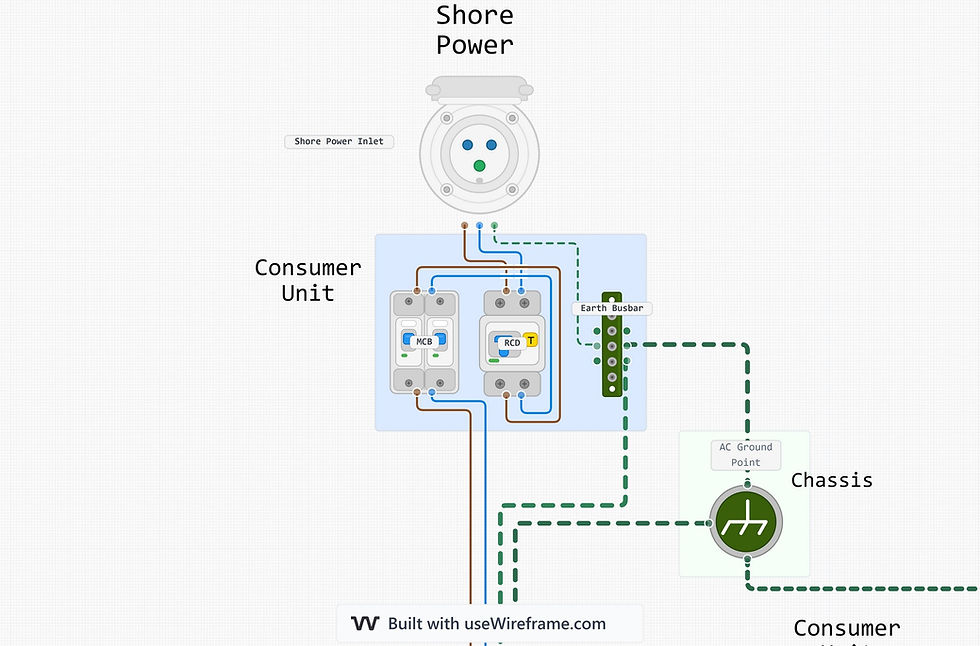
These are your live, neutral, and earth cables. The best way to wire up your shore power socket is using three-core mains cable. This comes bundled as a single cable with an outer insulation sheath, inside which you have your three mains cables. Choosing three-core cable makes for tidier wiring and an overall more convenient setup.

This cable needs to be sized properly. In the UK and Europe, we spec our mains inputs for 16A, which is the standard current found in campsite power supplies. 1.5mm² cable is capable of carrying 16A at 230V, but taking into account voltage drop due to cable length, and rounding up for safety (as we should always do), we land on 2.5mm² as the suitable gauge for this cable. To learn more, take a look at our ultimate guide to campervan wire sizing.
Once we have our cable, we need to wire it in to the back of the shore power inlet. You'll need to fit the ends of the three cables with crimp connectors; the exact connector type will depend on the type of connection found at the back of your shore inlet. In the case of the shore power inlet we recently installed in Shane's new van, we fitted ferrules to match the screw terminals in the back of the inlet.

To fit the ferrules, the process is as follows:
Strip away ~5cm of the outer sheath on the three-core cable with a Stanley knife, exposing the individual cables
Strip away ~1cm of the insulation sheath on each of the three individual cables using a wire stripping tool
Fit the ferrules and crimp them in place using a ferrule crimping tool
Fit heat shrink tubing over the ferrule's collar and shrink it into place using a heat gun

Our ultimate guide to campervan wiring has all the details on crimp connector types and the nuances of fitting them: check it out here.
You've now got a shore power inlet with the AC supply cable coming into the van. This is the start of your van's AC system which will have the MultiPlus at its core. Take a look at the Victron MultiPlus wiring diagram again:
You can see that the first thing we do is wire the AC supply cable into a consumer unit. The consumer unit is a box containing an earth busbar, a residual current device (RCD) and one or more miniature circuit breakers (MCBs). These are essential safety devices for your AC system, providing protection against overcurrent and short circuits.
RCD: Residual Current Device; a GFCI or Ground-Fault Circuit Interruptor is the North American Equivalent. Protects you from electric shock when it detects current leaking to earth. It's an essential safety component and required by regulations worldwide. Read more about electrical system grounding here.
MCB: Miniature Circuit Breaker. We use these instead of fuses in AC systems to protect against overload and short-circuit.
RCBO: Residual Current Breaker with Over-current. Combines an RCD with an MCB in one device, providing comprehensive protection for AC systems.
Read more about these protection devices in our article on shore power, where we give you all the information you need to decide on a consumer unit configuration that matches your setup.
You can see from the wiring diagram that we need to bring both the live and neutral wires into the consumer unit and wire them both into the RCD. Insert the ferrules you fitted to the cables into the input screw terminals at the top of the RCD, and tighten the screws down until they hold the ferrules securely in place. Next, prepare a live and a neutral wire with ferrules on each end, and use this to connect the RCD output terminals to the input terminals of your MCB. Another pair of wires will connect to the MCB's output terminals and exit the consumer unit en route to your MultiPlus.

You can also see that we need to run a ground wire from your shore power inlet to the consumer unit's ground busbar, and then connect the ground busbar to your chassis' common ground point. Ground points are an important safety component of any electrical system; be sure to read much more about them in this article. In brief; you will need at least two ground points in your campervan; a DC ground point and an AC ground point. These should be separated by at least 5cm. To install your AC ground point:
Choose your ground point location on an unobstructed part of the van's metal chassis which you'll be able to keep accessible, close to your shore inlet, MultiPlus, and batteries.
Sand down the paint at your ground point and drill a hole big enough for an M8 bolt
Size your ground cables appropriately and fit appropriately-sized ring terminals
Fit the ground point bolt, separating the ground cable ring lug from the chassis with a star tooth lock washer and tightening the bolt in place with a nut
Once your shore power socket, consumer unit, and AC ground point are in place, we can move on to the next section of the Victron MultiPlus wiring diagram.
Still figuring out your van electrics?
This is where most people get stuck — trying to piece everything together from scattered advice, second-guessing cable sizes, fuses, and system design.
The Van Electrics Masterclass walks you through the entire system step-by-step — so you can design and install it properly, with confidence.

Part Two: Wiring Up the Victron MultiPlus
The neutral and live cables coming from our consumer unit are now ready to be wired into our MultiPlus. Let's have a look at what other cables are connected.

You can see that our live and neutral cables, as well as the ground cable from the consumer unit ground busbar, come into the MultiPlus. You can also see that there's a direct ground connection from the MultiPlus to the chassis ground point in the top right corner. Let's take a look at the MultiPlus' actual connection terminals to figure out where these all go. First, you'll need to remove the MultiPlus's face plate; do this by removing the four silver screws on the front of the unit.

With the faceplate removed, you'll have exposed the MultiPlus' main circuit board:

Let's zoom in on the bottom portion of the circuit board, which houses our connection points.

We're interested in the ones on the left for now; these are our AC connection points. They're screw terminals, just like the ones in MCBs and RCDs, so you'll need ferrules on the ends of your wires. The terminals are very well labelled; on the left, there are three AC in terminals: ground, line, and neutral. These are for the cables coming from your shore power inlet's consumer unit. Ground comes from the consumer unit's ground busbar, line is the live wire from the MCB, and neutral is the neutral wire from the MCB.
Bring these into the MultiPlus through the dedicated entry glands on the bottom of the unit.

Your MultiPlus now has its AC power connection. Looking at the wiring diagram, we can see that there's also a direct ground connection from the MultiPlus to the AC chassis ground point. This is the MultiPlus' case ground. Your MultiPlus has a bolt through the external casing; this case ground protects you from electric shocks in the event that the metal casing gets electrified by a loose wire. Run a ground cable from this bolt directly to your AC chassis ground.

That's our AC inputs sorted. Let's take a look at the DC side.

The most obvious connection points here are our battery positive and negative terminals. These are the terminals which will connect to your main DC positive and negative busbars. These are thick wires; again, make sure you size them correctly. Both the MultiPlus and busbar are equipped with bolt connectors, so fit your wires with ring terminals and bolt them to the MultiPlus terminals. Then, feed the wires through the cable slot at the bottom of the unit.

We discuss battery busbars in detail in our ultimate guide to leisure batteries, so be sure to read that before speccing your system. In brief, your battery busbars are the big connection points which distribute power coming to and from your leisure batteries. These busbars should be sized for the total battery bank current; the same current you should have already sized the main cables connecting the MultiPlus to your batteries for. It's best practice to connect the heaviest load to the middle of the busbar and lighter loads on the outer terminals; the cables connecting your MultiPlus to these busbars should therefore be bolted to the middle terminal on both busbars.

You need to make sure that the positive feed from the MultiPlus to the positive battery busbar is fused and that there's an isolation switch on the line. The fuse is the MultiPlus' primary protection device, and the switch allows you to cut all power coming to the MultiPlus from the batteries. The fuse and switch should be sized 5% smaller than the wire they're on, rounding up to the nearest standard size (as discussed in our article on wire and fuse sizing).
With your MultiPlus connected to your battery busbars and that connection fused and switched for safety, the DC side of the shore power system is finished. Let's now move on to the last segment of the MultiPlus wiring diagram: the AC plug sockets.
Part Three: Wiring Up the Mains Plug Sockets
The last section of our MultiPlus wiring diagram is the section that powers our mains plug sockets. This is the key function of the inverter part of your MultiPlus. Let's take a look at the Wireframe wiring diagram again:
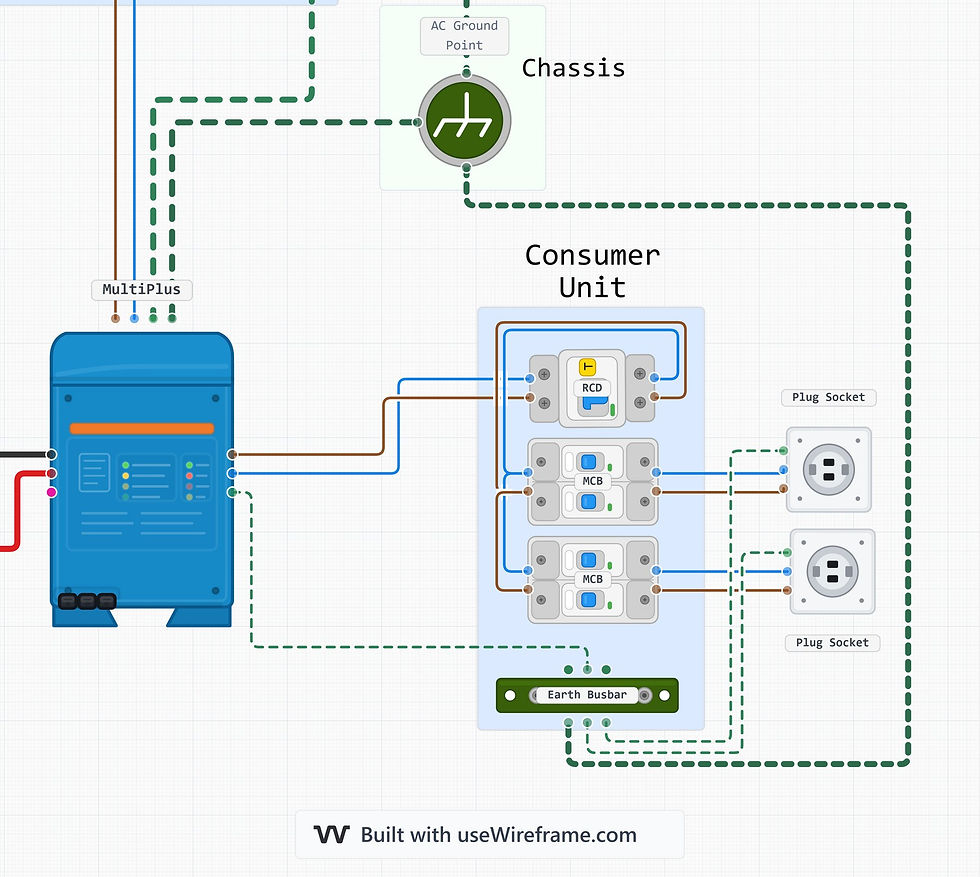
You can see that this side of the system also starts with a consumer unit. This consumer unit is wired exactly the same as the one at the shore inlet side of the system. Our live and neutral cables come from the MultiPlus and enter the consumer unit, connecting first to an RCD. From there, we have as many MCBs as there are plug sockets. These MCBs are wired in series, and each one is wired into a plug socket. Completing the safety functionality of the consumer unit is the earth busbar, which is wired to the MultiPlus, both plug sockets, and the van's AC chassis ground. Let's have another look at the MultiPlus to see where our initial AC cables connect.

We're back at the MultiPlus' AC connection ports. This time, we're on the right hand side of the terminal block, labelled 'AC OUT'. We wire this up just the same as the AC IN side; live, neutral, and ground cables (appropriately sized), with ferrules fitted, screwed into the screw terminals. Don't overtighten the screws: tighten them enough that the wires can't easily be pulled out, but no tighter than this.
The MultiPlus has two live output terminals, but they’re internally connected to the same point. They’re there so you can connect two outgoing cables without doubling up wires in one terminal. In more complex systems, you might use this to partition a separate AC section of your electrical system, or a specific dedicated load like a water heater. There’s only one neutral terminal because all circuits share the same neutral internally. If you use both live terminals, both circuits must also connect to the same neutral, usually via a neutral busbar. The vast majority of campervan electrical systems will only use the one live terminal.
Once you have your neutral, live, and ground cables connected, bring them out of the cable glands at the bottom of the unit and into the consumer unit. The live and neutral cables go into the input side of your RCD, and the ground cable goes to the consumer unit's earth busbar.
This consumer unit has an MCB for each individual AC circuit. If you only have one AC plug socket in your van, you only need one MCB. Many van builders choose to have two AC plug sockets, in which case twin MCBs are needed. You might, as in Shane's case, have a dedicated AC appliance which you want to permanently wire into the MultiPlus; in Shane's new van, this is an induction hob. In that case, you'd need three MCBs:

Each mains plug socket contains screw terminals like the MultiPlus, and fitting wires into these is the same. Each plug socket/AC appliance needs its own ground connection to the consumer unit's earth busbar. Finalise the wiring of this section by connecting the earth busbar to the AC chassis ground.
With this last section of wiring, your MultiPlus is fully functional. There are some additional wires that could be connected: let's take a look at these.
Part Four: Data and Auxiliary Cables
Let's have another look at the MultiPlus' connection block:

These are all low-current signal connection ports, designed to carry information rather than any important quantity of power. Handily labelled, they're for use as follows:
V-SENSE: remote voltage sensing for leisure batteries; connects directly to battery terminals and compensates for voltage drop in main battery cables, allowing the MultiPlus to charge your batteries more accurately and efficiently
AUX-I/O: programmable input/output terminal whose behaviour is controlled through Victron's VEConfigure software; can be configured for functions like generator start/stop, warning alarm, external control of MultiPlus
TRICKLE CHARGE: used to connect a trickle charger to your starter battery; used to keep the vehicle's starter battery topped up during long periods of no driving. It's worth noting that this only works if you've got lead-acid (FLA, gel, or AGM) leisure batteries, not if you're installing lithium
GND RELAY: output to programmable relay; can be used to control external devices like a generator, context-controlled lights, alarms
T-SENSE: battery temperature sensor input; allows temperature-compensated charging of batteries, useful if you expect to experience extreme temperature swings as battery charge performance changes with temperature
These are all spring clamp connectors; connectors with an internal clamp that holds the wire in place and is actuated via the orange tab. Any wire inserted into these should be fitted with a ferrule. With the ferrule in place:
Press in on the orange tab on the connector with a small flathead screwdriver
Insert the ferrule into the circular hole
Release the orange tab
Check that the wire is now tightly held in place
The last auxiliary ports of interest are these two, fitted to the smaller PCB above the AC in/out section:

These are VE.Bus ports, which take an RJ45 data cable. With these, you can connect your MultiPlus to a Victron Cerbo or Ecrano GX monitoring device, giving you detailed system monitoring capability and integration into Victron's GX monitoring ecosystem; read all about that here.
Final Thoughts
With that, we've explored every element of the Victron MultiPlus wiring diagram, and your AC system is good to go. The most important aspects of this guide are:
Making sure your wires and fuses are sized correctly; make sure you read all about that in our ultimate guide before jumping in
Making sure your ground connections are in place; read all about that here
Making sure your consumer units are correctly wired and configured; read all about consumer units, RCDs, MCBs, and related devices here
Those safety elements are essential for a safe AC system, where voltage is high and can be dangerous. Once everything's wired up, close up your consumer units and mount them somewhere solid and secure. Mount your MultiPlus, busbars, switches, and fuse holders in the same way; we like to mount all our electrical components on a system board for a solid, organised setup.
To give yourself the best start on your AC system, plan it out with Wireframe. Wireframe makes it easy to produce tidy, organised wiring diagrams which will serve you well when ordering your components and wiring them together. You can use Wireframe to size your wires and fuses, and do all the relevant checks to ensure your system will work before ordering the components. Take a look at Wireframe here.
Still unsure how to design your van electrics?
Start with the free wiring diagrams below.
Want to build your van electrical system properly from start to finish?
The Van Electrics Masterclass shows you exactly how to design and install a safe, reliable electrical system — step by step.
Until next time.

